Real-time Multiplayer with Photon
Click on the floor to move.
The complete project including matchmaking can be found here.
Photon (also known as PUN) is used in many games and has a JavaScript SDK available for HTML5 games.
Photon is for free for projects with up to 20 online players (CCU).
You will learn
- How to add Photon SDK to PlayCanvas
- Multiplayer implementation with Photon
Setup
PlayCanvas Project
We start by forking the tutorial project here.
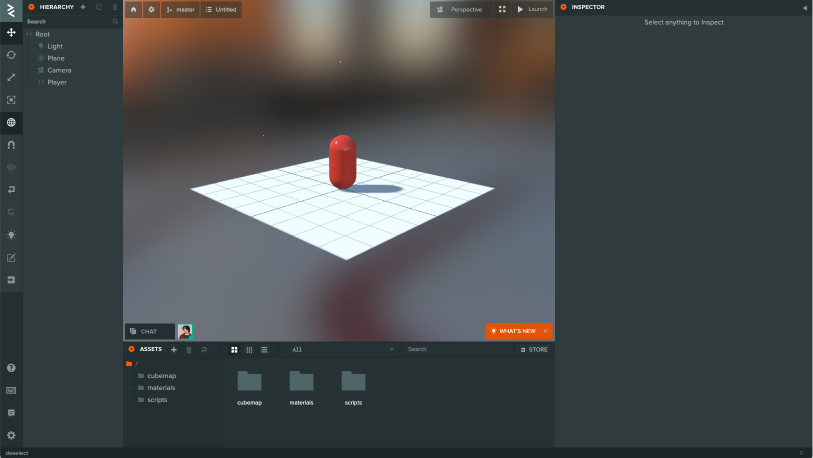
Photon account
Account registration is required to use the SDK and view documentation.
Create your Photon account here - (Photon Engine).
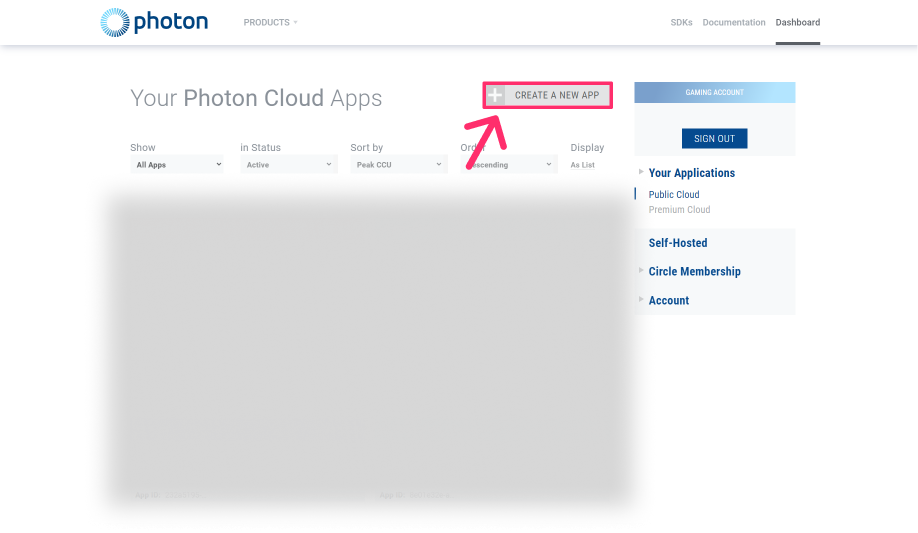
Create a new app
Click CREATE NEW APP from the dashboard
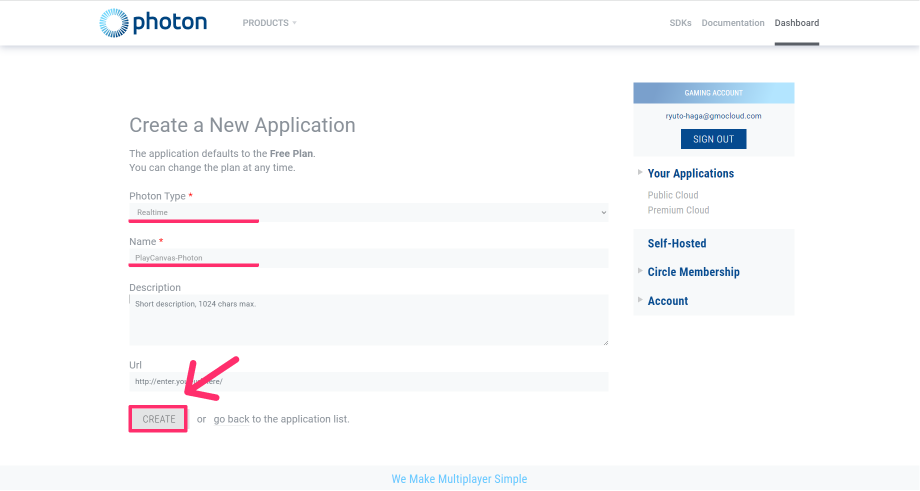
Select Photon Type and Application name
Enter the following
- Photon Type: RealTime
- Name: PlayCanvas-Photon etc.
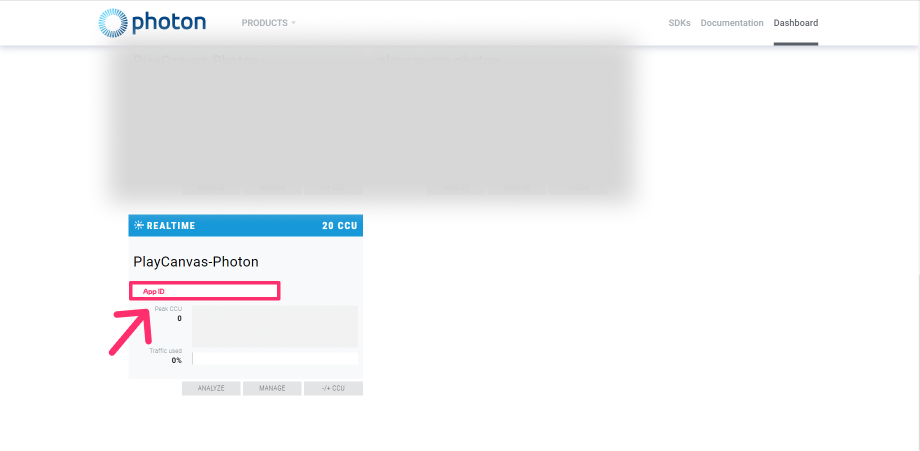
Copy of AppID
Please make a note of this AppId, as you will need it in the future.
Download SDK
Download the SDK from the dashboard.
Click SDK from the dashboard
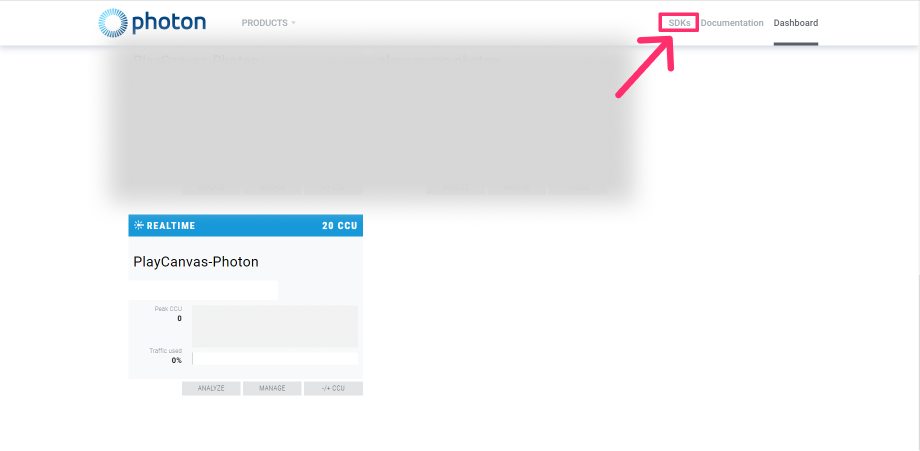
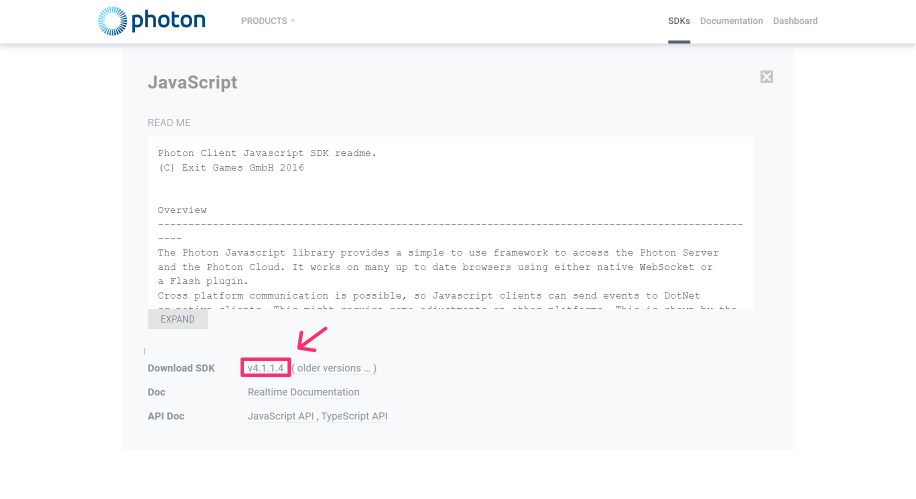
Select RealTime JavaScript

Click Download SDK
Unzip the SDK
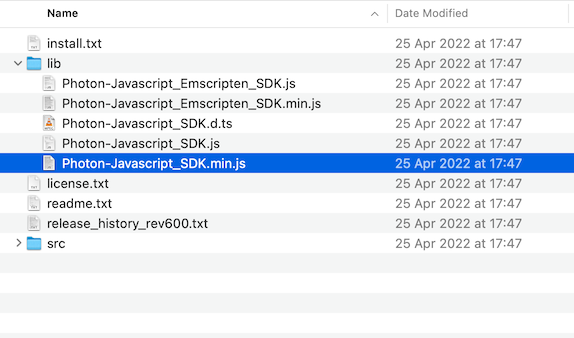
The SDK will be downloaded in ZIP format, unzip it: photon-javascript-sdk_vX-X-X-X → lib → Photon-Javascript_SDK.min.js.
Importing SDK
Import the SDK you have just downloaded into the PlayCanvas editor.
Upload the SDK on the editor
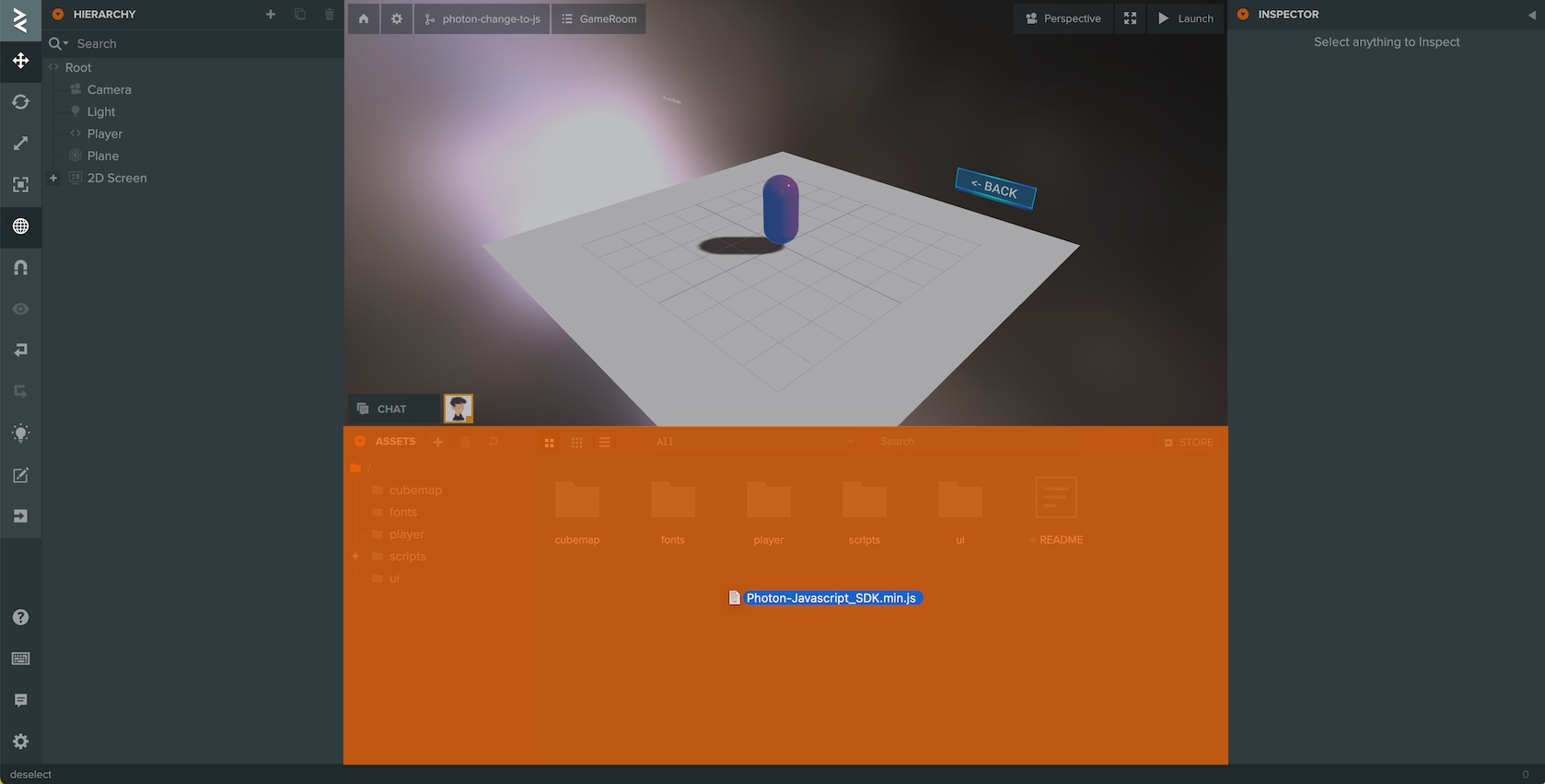
Drag and drop the SDK to the assets in the editor.
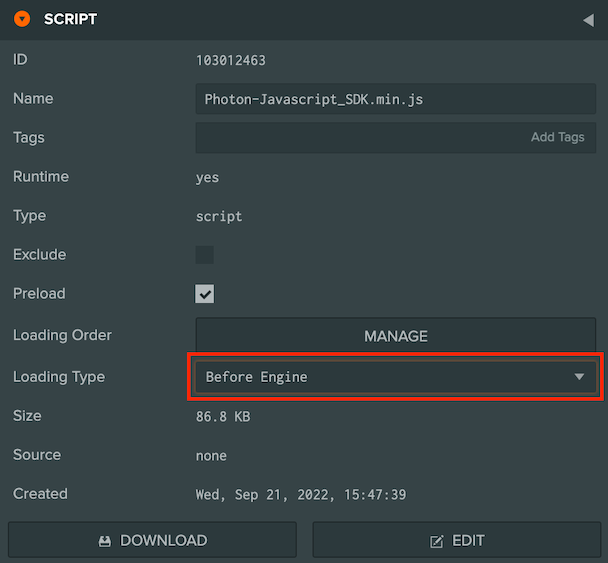
Change Loading Type "Asset" to "Before Engine"
Multiplayer implementation
The multiplayer implementation will do the following:
- Use Photon class for real-time communication and Load Balancing
- Connect to Photon master server
- Create or Join a room
- Synchronize other players' actions and movement
The API reference and glossary are available on Photon's site.
Using Photon with PlayCanvas
Instantiate classes from PlayCanvas to use Photon
Create a script asset named photon-loadbalancing-playcanvas.js to the project to initialize Photon.
- ESM
- Classic
import { Script } from 'playcanvas';

/** @enum {string} */
const Region = {
    "Select Region": "default",
    "Asia, Singapore": "asia",
    "Australia, Melbourne": "au",
    "Canada, East Montreal": "cae",
    "Chinese Mainland (See Instructions) Shanghai": "cn",
    "Europe, Amsterdam": "eu",
    "India, Chennai": "in",
    "Japan, Tokyo": "jp",
    "Russia Moscow": "ru",
    "Russia, East Khabarovsk": "rue",
    "South Africa Johannesburg": "za",
    "South America, Sao Paulo": "sa",
    "South Korea, Seoul": "kr",
    "Turkey Istanbul": "tr",
    "USA, East Washington": "us",
    "USA, West San José": "usw",
}

export class PhotonLoadBalancingPlayCanvas extends Script {
    static scriptName = "photonLoadBalancingPlayCanvas";

    /**
     * @attribute
     * @title App Id
     * @type {string}
     */
    appId = null;

    /**
     * @attribute
     * @title App Version
     * @type {string}
     */
    appVersion = "1.0";

    /**
     * @attribute
     * @title Wss
     * @type {boolean}
     */
    wss = true;

    /**
     * Photon Cloud has servers in several regions, distributed across multiple hosting centers over the world.You can choose optimized region for you.
     *
     * @attribute
     * @type {Region}
     */
    region = Region["Europe, Amsterdam"]

    initialize() {
        // Assuming Photon and its LoadBalancingClient are globally available or imported
        this.loadBalancingClient = new Photon.LoadBalancing.LoadBalancingClient(this.wss ? Photon.LoadBalancing.Constants.ConnectionProtocol.Wss : Photon.LoadBalancing.Constants.ConnectionProtocol.Ws, this.appId, this.appVersion);

        // pc.Application
        this.loadBalancingClient.app = this.app;
    }
}
const PhotonLoadBalancingPlayCanvas = pc.createScript("photonLoadBalancingPlayCanvas");
PhotonLoadBalancingPlayCanvas.attributes.add("appId", { type: "string" });
PhotonLoadBalancingPlayCanvas.attributes.add("appVersion", { type: "string", default: "1.0" });
PhotonLoadBalancingPlayCanvas.attributes.add("wss", { type: "boolean", default: true });
PhotonLoadBalancingPlayCanvas.attributes.add("region", {
    type: "string", default: "jp",
    description: "Photon Cloud has servers in several regions, distributed across multiple hosting centers over the world.You can choose optimized region for you.",
    enum: [
        { "Select Region": "default" },
        { "Asia, Singapore": "asia" },
        { "Australia, Melbourne": "au" },
        { "Canada, East Montreal": "cae" },
        { "Chinese Mainland (See Instructions) Shanghai": "cn" },
        { "Europe, Amsterdam": "eu" },
        { "India, Chennai": "in" },
        { "Japan, Tokyo": "jp" },
        { "Russia Moscow": "ru" },
        { "Russia, East Khabarovsk": "rue" },
        { "South Africa Johannesburg": "za" },
        { "South America, Sao Paulo": "sa" },
        { "South Korea, Seoul": "kr" },
        { "Turkey Istanbul": "tr" },
        { "USA, East Washington": "us" },
        { "USA, West San José": "usw" },
    ],
});

PhotonLoadBalancingPlayCanvas.prototype.initialize = function () {

    // Photon Settings
    this.loadBalancingClient = new Photon.LoadBalancing.LoadBalancingClient(this.wss ? 1 : 0, this.appId, this.appVersion);

    // pc.Application
    this.loadBalancingClient.app = this.app;
};
- Photon.LoadBalancing.LoadBalancingClient This class contains many of the features of the Photon SDK for real-time communication.
Set Script for Root entity
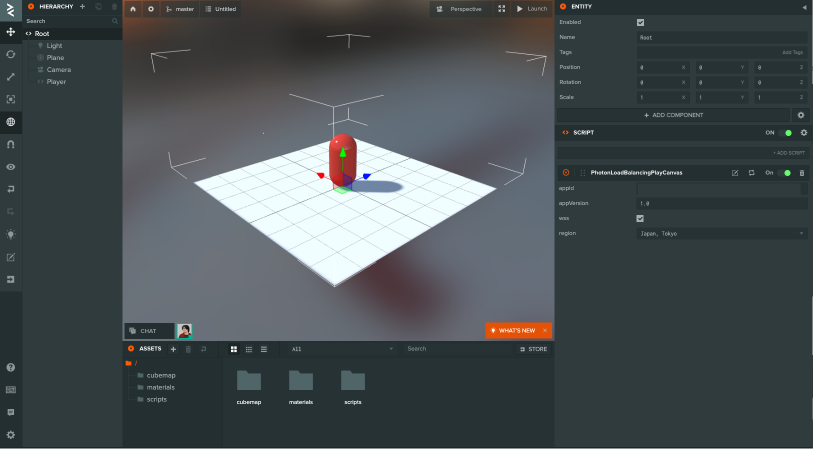
Create a new script asset photon-loadbalancing-playcanvas.js and attach it to the Root entity in the Editor.
Paste AppId into the script attribute
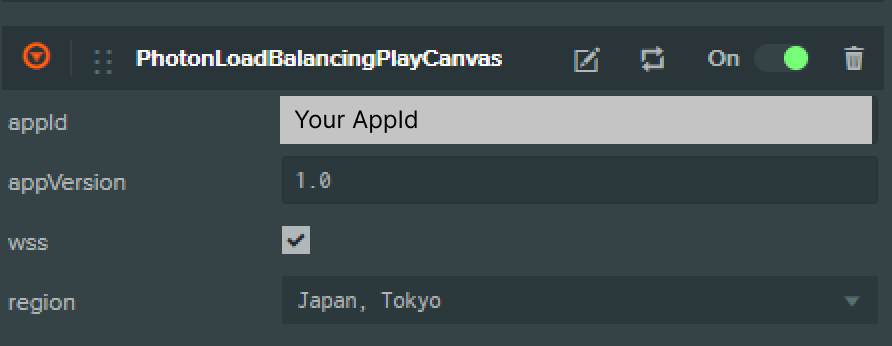
Enter AppId as a script attribute.
this.loadBalancingClient = new Photon.LoadBalancing.LoadBalancingClient( this.wss ? 1 : 0, this.appId, this.appVersion );
- wss Secure connection via WebSocket.
- appId The application identifier value.
- appVersion Used for versioning. Different versions cannot be connected to each other.
Connect to the Photon master server
Connect to the master server using connectToRegionMaster
- ESM
- Classic
initialize () {

    // Photon Settings
    this.loadBalancingClient = new Photon.LoadBalancing.LoadBalancingClient(this.wss ? 1 : 0, this.appId, this.appVersion);

    // pc.Application
    this.loadBalancingClient.app = this.app;

    // Connect to the master server
    if (!this.loadBalancingClient.isInLobby()) {
        this.loadBalancingClient.connectToRegionMaster(this.region);
    }
}
PhotonLoadBalancingPlayCanvas.prototype.initialize = function () {

    // Photon Settings
    this.loadBalancingClient = new Photon.LoadBalancing.LoadBalancingClient(this.wss ? 1 : 0, this.appId, this.appVersion);

    // pc.Application
    this.loadBalancingClient.app = this.app;

    // Connect to the master server
    if (!this.loadBalancingClient.isInLobby()) {
        this.loadBalancingClient.connectToRegionMaster(this.region);
    }
};
- connectToRegionMaster Connects to the master server in the specified region.
- this.region Used to configure the region.
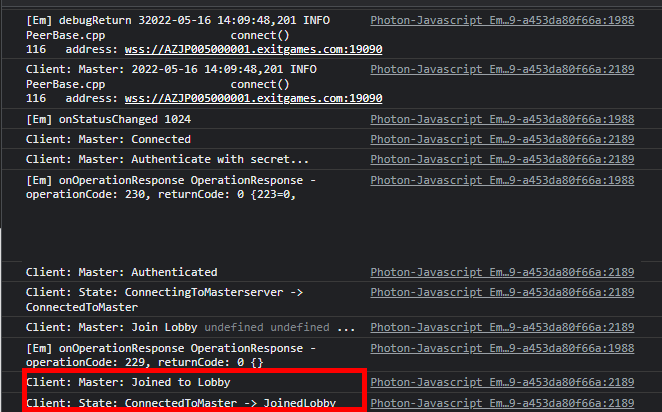
If you successfully connect to the lobby by running connectToRegionMaster, JoinedLobby will be displayed in the log.
Create or Join a room
onRoomList function is called when a connection is made to the lobby.
JoinRandomOrCreateRoom to join a room if it exists, or randomly join a room if it does not exist.
- ESM
- Classic
initialize() {

    // Photon Settings
    this.loadBalancingClient = new Photon.LoadBalancing.LoadBalancingClient(this.wss ? 1 : 0, this.appId, this.appVersion);

    // pc.Application
    this.loadBalancingClient.app = this.app;

    // Connect to the master server
    if (!this.loadBalancingClient.isInLobby()) {
        this.loadBalancingClient.connectToRegionMaster(this.region);
    }

    // Added
    this.loadBalancingClient.onRoomList = this.onRoomList;
    this.loadBalancingClient.onJoinRoom = this.onJoinRoom;
}

onRoomList() {
    this.joinRandomOrCreateRoom();
}

onJoinRoom(createdByMe) {
    console.log("Joined the room.");
}
PhotonLoadBalancingPlayCanvas.prototype.initialize = function () {

    // Photon Settings
    this.loadBalancingClient = new Photon.LoadBalancing.LoadBalancingClient(this.wss ? 1 : 0, this.appId, this.appVersion);

    // pc.Application
    this.loadBalancingClient.app = this.app;

    // Connect to the master server
    if (!this.loadBalancingClient.isInLobby()) {
        this.loadBalancingClient.connectToRegionMaster(this.region);
    }

    // Added
    this.loadBalancingClient.onRoomList = this.onRoomList;
    this.loadBalancingClient.onJoinRoom = this.onJoinRoom;
};

PhotonLoadBalancingPlayCanvas.prototype.onRoomList = function () {
    this.joinRandomOrCreateRoom();
};

PhotonLoadBalancingPlayCanvas.prototype.onJoinRoom = function (createdByMe) {
    console.log("Joined the room.");
};
- onRoomList(rooms) List of rooms in the lobby.
- joinRandomOrCreateRoom(options, createRoomName, createOptions) Join to a random room. If the room does not exist, a new room will be created.
- onJoinRoom When you join a room, this is called.
Join and Leave
When a player joins a room, it is synchronized with other players. Use onActorJoin and onActorLeave.
PhotonLoadBalancingPlayCanvas.prototype.initialize = function () {

    // Photon Settings
    this.loadBalancingClient = new Photon.LoadBalancing.LoadBalancingClient(this.wss ? 1 : 0, this.appId, this.appVersion);

    // pc.Application
    this.loadBalancingClient.app = this.app;

    // Connect to the master server
    if (!this.loadBalancingClient.isInLobby()) {
        this.loadBalancingClient.connectToRegionMaster(this.region);
    }

    this.loadBalancingClient.onRoomList = this.onRoomList;
    this.loadBalancingClient.onJoinRoom = this.onJoinRoom;

    // Added
    this.loadBalancingClient.onActorJoin = this.onActorJoin;
    this.loadBalancingClient.onActorLeave = this.onActorLeave;
};

PhotonLoadBalancingPlayCanvas.prototype.onRoomList = function () {
    this.joinRandomOrCreateRoom();
};

PhotonLoadBalancingPlayCanvas.prototype.onJoinRoom = function (createdByMe) {
    console.log("Joined the room.");
};

PhotonLoadBalancingPlayCanvas.prototype.onActorJoin = function (actor) {
    const { actorNr } = actor;
    if (actor.isLocal) return;
    const otherPlayer = new pc.Entity();
    otherPlayer.addComponent("render", { type: "capsule" });
    otherPlayer.setLocalPosition(0, 1, 0);
    otherPlayer.name = actorNr;
    this.app.root.children[0].addChild(otherPlayer);
};

PhotonLoadBalancingPlayCanvas.prototype.onActorLeave = function (actor) {
    const { actorNr } = actor;
    const otherPlayer = this.app.root.children[0].findByName(actorNr);
    if (actor.isLocal || !otherPlayer) return;
    otherPlayer.destroy();
};

- actor contains
name,actorNr,isLocal, anduserId. - onActorJoin when a new user connects, you can get the joined actor.
- onActorLeave when a user is disconnected, you can get the disconnected actor.
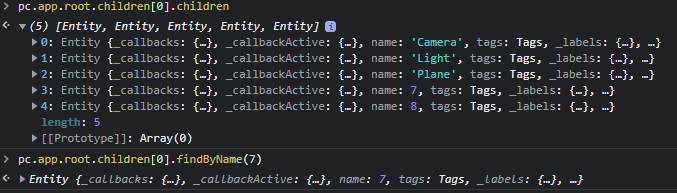
If successful, the entity is added when the player joins.
Player Movement
Create a new player.js for character movement.
- ESM
- Classic
import { Script, Vec3, KEY_LEFT, KEY_RIGHT, KEY_UP, KEY_DOWN } from 'playcanvas';

export class Movement extends Script {
    static scriptName = "movement";

    update (dt) {
        const pos = new Vec3(0, 0, 0);
        if (this.app.keyboard.isPressed(KEY_LEFT)) {
            pos.x = -dt;
        }
        if (this.app.keyboard.isPressed(KEY_RIGHT)) {
            pos.x = dt;
        }
        if (this.app.keyboard.isPressed(KEY_UP)) {
            pos.z = -dt;
        }
        if (this.app.keyboard.isPressed(KEY_DOWN)) {
            pos.z = dt;
        }
        if (!pos.equals(new Vec3(0, 0, 0))) {
            this.entity.translate(pos);
        }
    }
}
const Player = pc.createScript("player");

Player.prototype.update = function (dt) {
    const pos = new pc.Vec3(0, 0, 0);
    if (this.app.keyboard.isPressed(pc.KEY_LEFT)) {
        pos.x = -dt;
    }
    if (this.app.keyboard.isPressed(pc.KEY_RIGHT)) {
        pos.x = dt;
    }
    if (this.app.keyboard.isPressed(pc.KEY_UP)) {
        pos.z = -dt;
    }
    if (this.app.keyboard.isPressed(pc.KEY_DOWN)) {
        pos.z = dt;
    }
    if (!pos.equals(new pc.Vec3(0, 0, 0))) {
        this.entity.translate(pos);
    }
};
- this.app.keyboard.isPressed: check if the keyboard is pressed
Synchronize other players
Use raiseEvent and onEvent to synchronize the player's location.
Position synchronization using raiseEvent
- ESM
- Classic
import { Script, Entity } from 'playcanvas';

/** @enum {string} */
const Region = {
    "Select Region": "default",
    "Asia, Singapore": "asia",
    "Australia, Melbourne": "au",
    "Canada, East Montreal": "cae",
    "Chinese Mainland (See Instructions) Shanghai": "cn",
    "Europe, Amsterdam": "eu",
    "India, Chennai": "in",
    "Japan, Tokyo": "jp",
    "Russia Moscow": "ru",
    "Russia, East Khabarovsk": "rue",
    "South Africa Johannesburg": "za",
    "South America, Sao Paulo": "sa",
    "South Korea, Seoul": "kr",
    "Turkey Istanbul": "tr",
    "USA, East Washington": "us",
    "USA, West San José": "usw",
}

export class PhotonLoadBalancingPlayCanvas extends Script {
    static scriptName = "photonLoadBalancingPlayCanvas";

    /**
     * @attribute
     * @title App Id
     * @type {string}
     */
    appId = null;

    /**
     * @attribute
     * @title App Version
     * @type {string}
     */
    appVersion = "1.0";

    /**
     * @attribute
     * @title Wss
     * @type {boolean}
     */
    wss = true;

    /**
     * Photon Cloud has servers in several regions, distributed across multiple hosting centers over the world.You can choose optimized region for you.
     *
     * @attribute
     * @type {Region}
     */
    region = Region["Europe, Amsterdam"]

    initialize() {
        // Assuming Photon and its LoadBalancingClient are globally available or correctly imported
        this.loadBalancingClient = new Photon.LoadBalancing.LoadBalancingClient(this.wss ? Photon.LoadBalancing.Constants.ConnectionProtocol.Wss : Photon.LoadBalancing.Constants.ConnectionProtocol.Ws, this.appId, this.appVersion);

        this.loadBalancingClient.app = this.app;

        if (!this.loadBalancingClient.isInLobby()) {
            this.loadBalancingClient.connectToRegionMaster(this.region);
        }
        this.loadBalancingClient.onRoomList = this.onRoomList.bind(this);
        this.loadBalancingClient.onJoinRoom = this.onJoinRoom.bind(this);
        this.loadBalancingClient.onActorJoin = this.onActorJoin.bind(this);
        this.loadBalancingClient.onActorLeave = this.onActorLeave.bind(this);

        this.loadBalancingClient.onEvent = this.onEvent.bind(this);
        this.app.on("createOtherPlayerEntity", this.createOtherPlayerEntity, this);
        this.app.on("loadbalancing:sendPlayerPosition", this.sendPlayerPosition, this);
    }

    onRoomList() {
        this.joinRandomOrCreateRoom();
    }

    onJoinRoom(createdByMe) {
        this.myRoomActorsArray().forEach((actor) => {
            if (actor.isLocal) return;
            this.app.fire("createOtherPlayerEntity", actor);
        });
    }

    onActorJoin(actor) {
        if (actor.isLocal) return;
        this.app.fire("createOtherPlayerEntity", actor);
        const { x, y, z } = this.app.root.findByName("Player").getLocalPosition();
        this.app.fire("loadbalancing:sendPlayerPosition", { x, y, z });
    }

    onActorLeave(actor) {
        const { actorNr } = actor;
        const otherPlayer = this.app.root.findByName(actorNr);
        if (actor.isLocal || !otherPlayer) return;
        otherPlayer.destroy();
    }

    createOtherPlayerEntity(actor) {
        const { actorNr } = actor;
        const entity = new Entity();
        entity.addComponent("render", { type: "capsule" });
        entity.setLocalPosition(0, 1, 0);
        entity.name = actorNr;
        this.app.root.children[0].addChild(entity);
    }

    sendPlayerPosition(position) {
        this.loadBalancingClient.raiseEvent(1, { position });
    }

    onEvent(code, content, actorNr) {
        switch (code) {
            case 1: {
                const otherPlayer = this.app.root.findByName(actorNr);
                if (otherPlayer) {
                    const { x, y, z } = content.position;
                    otherPlayer.setLocalPosition(x, y, z);
                }
                break;
            }
            default:
        }
    }
}
const PhotonLoadBalancingPlayCanvas = pc.createScript("photonLoadBalancingPlayCanvas");
PhotonLoadBalancingPlayCanvas.attributes.add("appId", { type: "string" });
PhotonLoadBalancingPlayCanvas.attributes.add("appVersion", {
    type: "string",
    default: "1.0",
});
PhotonLoadBalancingPlayCanvas.attributes.add("wss", {
    type: "boolean",
    default: true,
});
PhotonLoadBalancingPlayCanvas.attributes.add("region", {
    type: "string",
    default: "jp",
    description:
        "Photon Cloud has servers in several regions, distributed across multiple hosting centers over the world.You can choose optimized region for you.",
    enum: [
        { "Select Region": "default" },
        { "Asia, Singapore": "asia" },
        { "Australia, Melbourne": "au" },
        { "Canada, East Montreal": "cae" },
        { "Chinese Mainland (See Instructions) Shanghai": "cn" },
        { "Europe, Amsterdam": "eu" },
        { "India, Chennai": "in" },
        { "Japan, Tokyo": "jp" },
        { "Russia Moscow": "ru" },
        { "Russia, East Khabarovsk": "rue" },
        { "South Africa Johannesburg": "za" },
        { "South America, Sao Paulo": "sa" },
        { "South Korea, Seoul": "kr" },
        { "Turkey Istanbul": "tr" },
        { "USA, East Washington": "us" },
        { "USA, West San José": "usw" },
    ],
});

PhotonLoadBalancingPlayCanvas.prototype.initialize = function () {

    // Photon Settings
    this.loadBalancingClient = new Photon.LoadBalancing.LoadBalancingClient(this.wss ? 1 : 0, this.appId, this.appVersion);

    // pc.Application
    this.loadBalancingClient.app = this.app;

    // Connect to the master server
    if (!this.loadBalancingClient.isInLobby()) {
        this.loadBalancingClient.connectToRegionMaster(this.region);
    }
    this.loadBalancingClient.onRoomList = this.onRoomList;
    this.loadBalancingClient.onJoinRoom = this.onJoinRoom;
    this.loadBalancingClient.onActorJoin = this.onActorJoin;
    this.loadBalancingClient.onActorLeave = this.onActorLeave;

    // Added
    this.loadBalancingClient.onEvent = this.onEvent;
    this.app.on("createOtherPlayerEntity", this.createOtherPlayerEntity, this);
    this.app.on("loadbalancing:sendPlayerPosition", this.sendPlayerPosition, this);
};

PhotonLoadBalancingPlayCanvas.prototype.onRoomList = function () {
    this.joinRandomOrCreateRoom();
};

PhotonLoadBalancingPlayCanvas.prototype.onJoinRoom = function (createdByMe) {
    this.myRoomActorsArray().forEach((actor) => {
        if (actor.isLocal) return;
        this.app.fire("createOtherPlayerEntity", actor);
    });
};

PhotonLoadBalancingPlayCanvas.prototype.onActorJoin = function (actor) {
    if (actor.isLocal) return;
    this.app.fire("createOtherPlayerEntity", actor);
    const { x, y, z } = this.app.root.findByName("Player").getLocalPosition();
    this.app.fire("loadbalancing:sendPlayerPosition", { x, y, z });
};

PhotonLoadBalancingPlayCanvas.prototype.onActorLeave = function (actor) {
    const { actorNr } = actor;
    const otherPlayer = this.app.root.findByName(actorNr);
    if (actor.isLocal || !otherPlayer) return;
    otherPlayer.destroy();
};

PhotonLoadBalancingPlayCanvas.prototype.createOtherPlayerEntity = function (actor) {
    const { actorNr } = actor;
    const entity = new pc.Entity();
    entity.addComponent("render", { type: "capsule" });
    entity.setLocalPosition(0, 1, 0);
    entity.name = actorNr;
    this.app.root.children[0].addChild(entity);
};

PhotonLoadBalancingPlayCanvas.prototype.sendPlayerPosition = function (position) {
    this.loadBalancingClient.raiseEvent(1, { position });
};

PhotonLoadBalancingPlayCanvas.prototype.onEvent = function (code, content, actorNr) {
    switch (code) {
        case 1: {
            const otherPlayer = this.app.root.findByName(actorNr);
            if (otherPlayer) {
                const { x, y, z } = content.position;
                otherPlayer.setLocalPosition(x, y, z);
            }
            break;
        }
        default:
    }
};
- raiseEvent(eventCode,data, options) send
eventCodeanddata. - onEvent(code, content, actorNr) receive data. Includes
actorNrandeventCode.
Changed to fire events when player moves
- ESM
- Classic
import { Script, Vec3, KEY_LEFT, KEY_RIGHT, KEY_UP, KEY_DOWN } from 'playcanvas';

export class Player extends Script {
    static scriptName = "player";

    update(dt) {
        const pos = new Vec3(0, 0, 0);
        if (this.app.keyboard.isPressed(KEY_LEFT)) {
            pos.x = -dt;
        }
        if (this.app.keyboard.isPressed(KEY_RIGHT)) {
            pos.x = dt;
        }
        if (this.app.keyboard.isPressed(KEY_UP)) {
            pos.z = -dt;
        }
        if (this.app.keyboard.isPressed(KEY_DOWN)) {
            pos.z = dt;
        }
        if (!pos.equals(new Vec3(0, 0, 0))) {
            this.entity.translate(pos);

            // Added
            const { x, y, z } = this.entity.getPosition();
            this.app.fire("loadbalancing:sendPlayerPosition", { x, y, z });
        }
    }
}
const Player = pc.createScript("player");

Player.prototype.update = function (dt) {
    const pos = new pc.Vec3(0, 0, 0);
    if (this.app.keyboard.isPressed(pc.KEY_LEFT)) {
        pos.x = -dt;
    }
    if (this.app.keyboard.isPressed(pc.KEY_RIGHT)) {
        pos.x = dt;
    }
    if (this.app.keyboard.isPressed(pc.KEY_UP)) {
        pos.z = -dt;
    }
    if (this.app.keyboard.isPressed(pc.KEY_DOWN)) {
        pos.z = dt;
    }
    if (!pos.equals(new pc.Vec3(0, 0, 0))) {
        this.entity.translate(pos);

        // Added
        const { x, y, z } = this.entity.getPosition();
        this.app.fire("loadbalancing:sendPlayerPosition", { x, y, z });
    }
};
- this.app.fire communication between scripts.
Done
You can now play multiplayer in Photon!
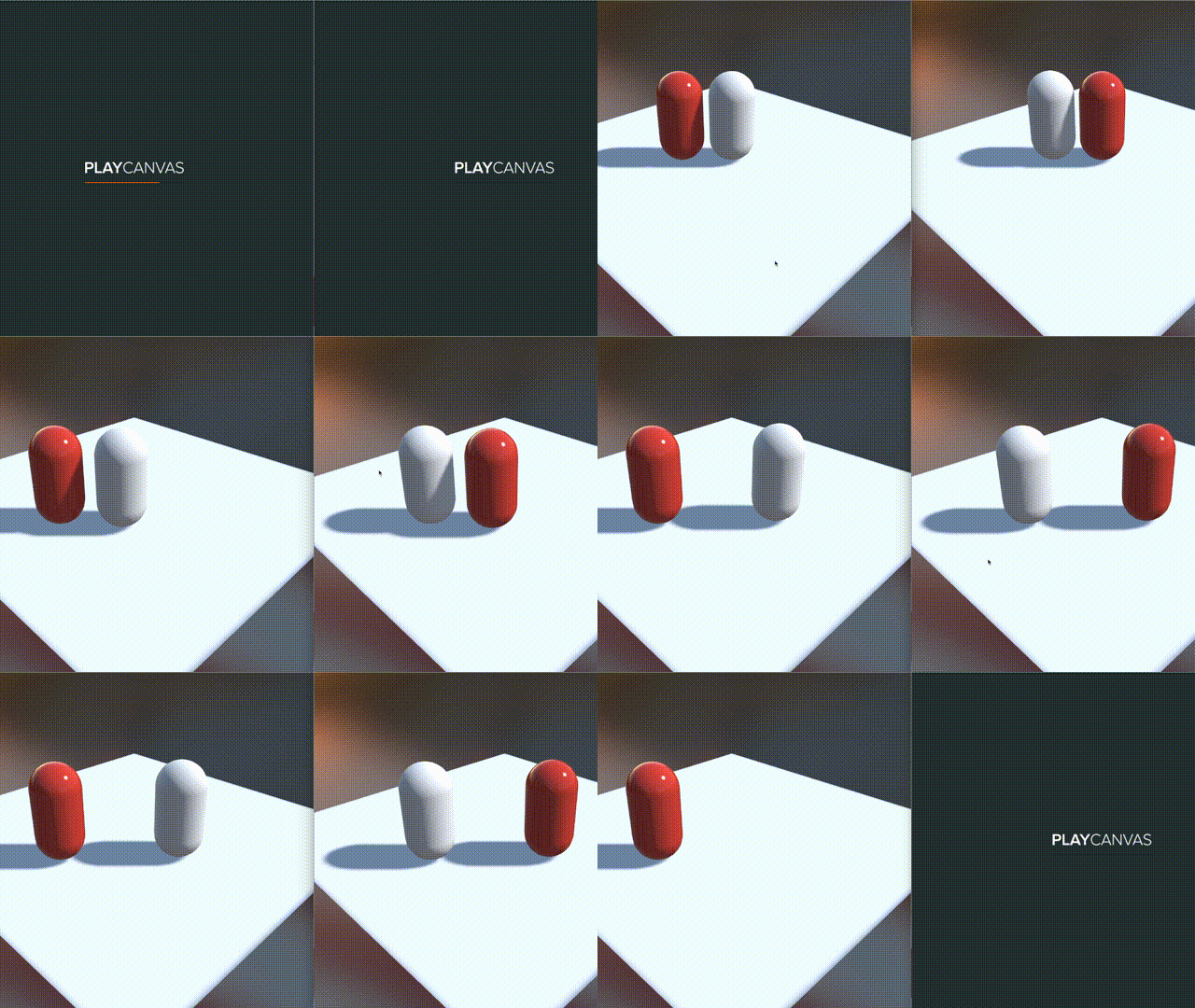
You can create a room using Photon and synchronize the positions of players with each other.
Although this project was only a simple real-time communication between players, you can also create a project that includes matchmaking. For the full project, including room creation and room listings, please click here .