Rendering Settings
Controls lighting, resolution, and rendering features.
note
These settings affect all users on the currently active branch of the project.
Navigate to the RENDERING section and expand the panel:
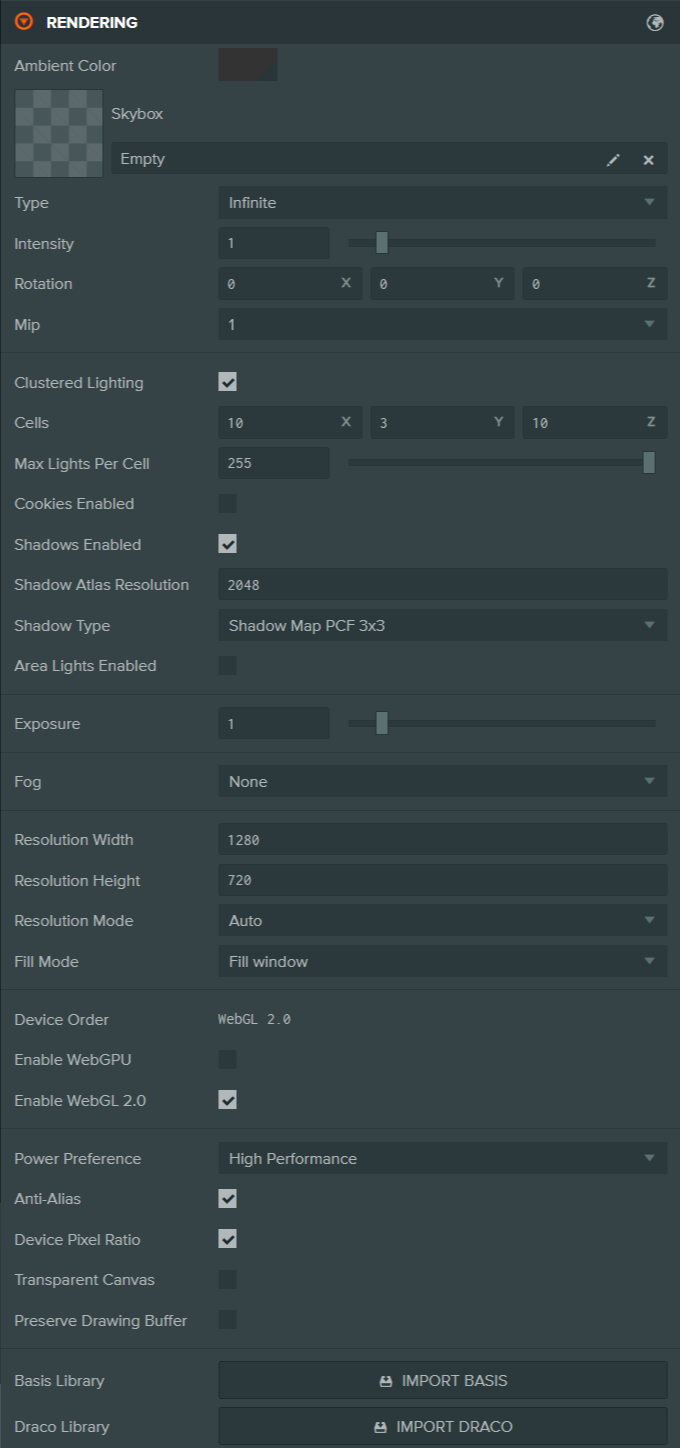
Here is a breakdown of the available settings:
Environment
| Setting | Description |
|---|---|
| Ambient Color | The color of the scene's ambient light, specified in sRGB color space. |
| Skybox | A cubemap asset rendered behind your 3D scene. Also used as the default environment map for physical materials when prefiltered. |
| Type | Select the projection used to render the skybox cubemap:
|
| Mesh Position / Rotation / Scale | The position, rotation and scale of the sky mesh. |
| Center | The relative normalized offset of the sky from the ground. |
| Intensity | The skybox intensity, used to match exposure levels. |
| Rotation | Rotation of the skybox. |
| Mip | Mip level of the prefiltered skybox. Higher values select lower-resolution, more blurred mips. |
Clustered Lighting
| Setting | Description |
|---|---|
| Clustered Lighting | Enable clustered lighting. |
| Cells (X, Y, Z) | Number of cells per world-space axis used to subdivide the space containing lights. |
| Max Lights Per Cell | Maximum number of lights a cell can store. |
| Max Lights | Maximum number of clustered lights visible in a frame. Keep this as low as the scene allows; values above 255 use a larger light-index texture. |
| Cookie Atlas Resolution | Resolution of the atlas texture storing all non-directional cookie textures. |
| Cookies Enabled | Clustered lights support cookies. |
| Shadows Enabled | Clustered lights support shadows. |
| Shadow Atlas Resolution | Resolution of the atlas texture storing all non-directional shadow textures. |
| Shadow Type | The type of shadow filtering used by all shadows. |
| Area Lights Enabled | Clustered lights support area lights. |
Gaussian Splatting
Scene-wide settings for Gaussian splat rendering. Per-entity LOD range and falloff live on the GSplat Component.
| Setting | Description |
|---|---|
| Radial Sorting | Sort splats by radial camera distance instead of view depth. |
| LOD Update Distance | Camera travel distance that triggers a Gaussian splat LOD update. |
| LOD Update Angle | Camera rotation in degrees that triggers an LOD update. Set to 0 to disable angle updates. |
| LOD Behind Penalty | Distance multiplier used for splat nodes behind the camera during LOD selection. |
| LOD Underfill Limit | Number of lower-detail LOD levels that can be used while optimal data loads. |
| Splat Budget | Target number of splats rendered across the scene. Non-positive values use the engine default. |
| Alpha Clip | Alpha threshold for Gaussian splat shadow, picking and prepass rendering. |
| Forward Alpha Clip | Alpha threshold below which splats are removed from the forward pass. |
| Min Pixel Size | Minimum screen-space size below which splats are discarded. |
| Min Contribution | Minimum visual contribution below which splats are culled. Set to 0 to disable it. |
| Foveation Strength | Strength of contribution culling towards the screen edges. Set to 0 to disable it. Only applies to the GPU-sorted raster renderer; on other renderers it has no effect. |
| Foveation Center | Protected screen-centre radius where foveation does not apply. |
| Anti-Alias | Apply anti-aliasing compensation to splats trained with anti-aliasing. |
| Use Fog | Apply scene fog to Gaussian splats. |
| Use Tonemapping | Apply camera tonemapping and scene exposure to Gaussian splats. Other scene objects are unaffected. |
| Color Update Angle | Viewing-angle change that triggers a spherical-harmonics color update. |
| Cooldown Ticks | Ticks an unused streamed splat resource waits before unloading. |
| Data Format | Work-buffer format used for Gaussian splat rendering. Options: Compact, Large. |
| Enable IDs | Store a unique component ID in the Gaussian splat work buffer. |
| LOD Mode | Metric used to select Gaussian splat detail within the global budget. Options: Error, Distance. |
Exposure & Fog
| Setting | Description |
|---|---|
| Exposure | The exposure value tweaks the overall brightness of the scene. |
| Fog | Controls an approximation of ambient fog in your scene. Types:
|
| Fog Density | Controls the rate at which fog fades in for Exp and Exp2 fog types. Larger values cause fog to fade in more quickly. Must be positive. |
| Fog Start / End | Distances, in scene units, where fog starts to fade in (start) and where it reaches maximum (end). |
Resolution
| Setting | Description |
|---|---|
| Resolution Width / Height | The width/height of your application in pixels. |
| Resolution Mode | Decides whether the canvas resolution changes when it is resized. |
| Fill Mode | Decides how the canvas fills the browser window. |
Device & API
| Setting | Description |
|---|---|
| Device Order | The order in which attempts are made to create the graphics devices. |
| Enable WebGPU | When enabled, the application will try to use WebGPU if available. |
| Enable WebGL 2.0 | When enabled, the application will try to use WebGL 2.0 if available. |
Rendering Options
| Setting | Description |
|---|---|
| Power Preference | Provides a hint to WebGL regarding the preferred power mode:
|
| Anti-Alias | When disabled, anti-aliasing is disabled for the back buffer. |
| Device Pixel Ratio | Multiplies the canvas back buffer resolution by the device pixel ratio (e.g., 2x on Retina). Increases sharpness and GPU/memory usage. |
| Transparent Canvas | Makes the canvas background transparent so the web page shows through. Useful for overlaying the app on custom page designs or UI. |
| Preserve Drawing Buffer | Preserves the drawing buffer until explicitly cleared. Useful for taking screenshots. |
External Libraries
| Setting | Description |
|---|---|
| Basis Library | Add the necessary libraries to support Basis compression. |
| Draco Library | Add the necessary libraries to support Draco compression. |